
Advanced Networking in Docker-Compose

Networking in docker can be confusing. I've written some more basic info about it here which you can read before this article if necessary, and there's a little more on it here too under point 4, 'Define a network'.
If you create a docker-compose service but do not specify a network, docker will create a network for you and two things will happen:
- it will assign a name, normally
default_service1, where 'service1' is the name of the first service in the stack - it will assign an IP subnet
I severely dislike both the naming convention and the way it assigns an IP subnet. Maybe it's my version of OCD or something similar, but for a few reasons I find it difficult to accept. So I set out to research how I could set the network directly from a docker-compose file, either by connecting to an existing network, creating a new one, or doing both, and making sure the network name and subnet were to my liking, all within the same docker-compose file.
Creating a network in docker-compose
We all know that we can create a service by creating a service block in our docker-compose.yml file, looking something like this:
services:
  service1:
    image: image1
    container_name: container1
    ports:
      - 1234:1234
    environment:
      - PUID=1000
      - PGID=100
    volumes:
      - /volume1/docker/service1:/app/config
super basic service creation in docker-compose
You may have also come across a network_mode: variable which lives in the third column (same as environment etc.), from which you can specify host or bridge mode. We will be focusing on the networks: variable, and we can add this to our docker compose like this:
services:
  service1:
    image: image1
    container_name: container1
    ports:
      - 1234:1234
    environment:
      - PUID=1000
      - PGID=100
    volumes:
      - /volume1/docker/service1:/app/config
    networks:
      - network1
If we were to try and spin up this container now using docker-compose up -d (and assuming everything else was correct) we would get an error, stating that the network 'network1' is undefined. The way that we define this is by adding a separate networks block:
services:
  service1:
    image: image1
    container_name: container1
    ports:
      - 1234:1234
    environment:
      - PUID=1000
      - PGID=100
    volumes:
      - /volume1/docker/service1:/app/config
    networks:
      - network1

networks:
  network1:
the networks block can go before or after any other block, it doesn't make a difference
Now if we were to run this container, docker would create a network called service1_network1 (done by taking the first service name and putting it in front of the defined network) assign a docker network IP to it (beginning 172.xx.x.x) and connect your 'service1' container to it.
Defining the network name and IP subnet
But let's say you had a specific network subnet you wanted to attach 'network1' to, and you didn't like the fact it had a double-barreled name. You can define these as follows:
networks:
  network1:
    name: network1
    ipam:
      config:
        - subnet: 172.50.0.0/24
        - gateway: 172.50.0.1 #optional
gateway doesn't seem to be a necessity, docker will assign that itself
Now when you run the docker-compose file, it will create a network called network1, assign it to that particular subnet (assuming it's free) and connect your container to it. So far so good.
Creating the 'default' docker network
A lot of us use a single docker-compose file to create multiple services, commonly known as a stack. We can name stacks using Portainer, or in ssh by using the -p flag in the following way:
docker-compose -p "namegoeshere" up -dLet's say we had a stack of 3 services, and we wanted them all to connect to a single, new network. Now we could specify networks: in each 'service' block, but we don't need to. We can do it directly from the ' networks' block:
services:
  service1:
    image: image1
    container_name: container1
    ports:
      - 1234:1234
    environment:
      - PUID=1000
      - PGID=100
    volumes:
      - /volume1/docker/service1:/app/config

  service2:
    image: image2
    container_name: container2
    ports:
      - 5678:5678
    environment:
      - PUID=1000
      - PGID=100
    volumes:
      - /volume1/docker/service2:/app/config

  service3:
    image: image3
    container_name: container3
    ports:
      - 80:80
    environment:
      - PUID=1000
      - PGID=100
    volumes:
      - /volume1/docker/service3:/app/config

networks:
  default:
    name: network1
    ipam:
      config:
        - subnet: 172.50.0.0/24
        - gateway: 172.50.0.1 #optional
So here we've assigned the 'default' network for this stack to be network1. This applies to all the services which do not have their own networks: variable, so the above would create a docker bridge network called network1, on subnet 172.50.0.0, and connect services 1, 2 and 3 to it.
Creating multiple networks and connecting your containers to them
Ok so we've covered single networks, default networks, naming them, assigning a subnet to them, and connecting your containers to them. So far so good.
In our next scenario, we have 3 services still. We want services 1 and 2 to connect to network1, and service3 another to connect to networkA. There's a few ways to do this, but the most straightforward would be to do it as follows:
services:
  service1:
    image: image1
    container_name: container1
    ports:
      - 1234:1234
    environment:
      - PUID=1000
      - PGID=100
    volumes:
      - /volume1/docker/service1:/app/config

  service2:
    image: image2
    container_name: container2
    ports:
      - 5678:5678
    environment:
      - PUID=1000
      - PGID=100
    volumes:
      - /volume1/docker/service2:/app/config

  service3:
    image: image3
    container_name: container3
    ports:
      - 80:80
    environment:
      - PUID=1000
      - PGID=100
    volumes:
      - /volume1/docker/service3:/app/config
    networks:
      - networkA

networks:
  default:
    name: network1
    ipam:
      config:
        - subnet: 172.50.0.0/24
        - gateway: 172.50.0.1 #optional
  networkA:
    name: networkA
    ipam:
      config:
        - subnet: 172.51.0.0/24
        - gateway: 172.51.0.1 #optional
Note the following:
- Services 1 and 2 do not have a
networks:variable in their blocks - this means they will be connected to the 'default' network, which we've named 'network1' - Service3 has a defined network in it's block, which points to 'networkA' in the defined
networksblock
I'm going to change our network names now to 'web-facing' and 'server-facing'. This next scenario (a little complicated) will explain why.
In our 3-service stack, each service needs to be able to communicate with each other, but only two need to be able to communicate with the internet. This means that all three need to be 'server-facing', and two (service2 and 3) need to be 'web-facing'. Our issue is that as soon as we define a networks: variable in a service block, it will no longer connect to a default network. Check out the following:
services:
  service1:
    image: image1
    container_name: container1
    ports:
      - 1234:1234
    environment:
      - PUID=1000
      - PGID=100
    volumes:
      - /volume1/docker/service1:/app/config
    networks:
      - server-facing

  service2:
    image: image2
    container_name: container2
    ports:
      - 5678:5678
    environment:
      - PUID=1000
      - PGID=100
    volumes:
      - /volume1/docker/service2:/app/config
    networks:
      - server-facing
      - web-facing

  service3:
    image: image3
    container_name: container3
    ports:
      - 80:80
    environment:
      - PUID=1000
      - PGID=100
    volumes:
      - /volume1/docker/service3:/app/config
    networks:
      - server-facing
      - web-facing

networks:
  server-facing:
    name: server-facing
    ipam:
      config:
        - subnet: 172.50.0.0/24
        - gateway: 172.50.0.1 #optional
  web-facing:
    name: web-facing
    ipam:
      config:
        - subnet: 172.51.0.0/24
        - gateway: 172.51.0.1 #optional
each block needs to be defined
Each service block has to define the network it will connect to, and these networks are defined in the network block at the bottom of the file. We manage which networks are able to connect to the internet by using our firewall to restrict or allow their various subnets, or the individual IPs if we want to (not something I'm going to go into now).
Connecting to pre-existing docker networks
Let's go back to our first service, and say we want to connect it to an existing network, called pre-made. We do it by defining the network as 'external', which means external only to the docker-compose file, not external to docker or the network ecosystem:
services:
  service1:
    image: image1
    container_name: container1
    ports:
      - 1234:1234
    environment:
      - PUID=1000
      - PGID=100
    volumes:
      - /volume1/docker/service1:/app/config
    networks:
      - pre-made

networks:
  pre-made:
    external: true
The above tells docker to look for a pre-existing docker network called 'pre-made' and connect the container service1 to it. In the same way as before, you can define multiple external networks to connect to the same or multiple containers in a single stack.
Combining new and external networks in a single stack
So you've got a stack which has the following containers in it:
- Service 1, front end app, needs access to the internet and the database
- Service 1-a, database for front end app, needs access to the front end app
- Service 2, local only, no need for access to anything else, therefore should be on its own network
- Service 3, needs access to another container not in this stack, which is on the pre-existing network named 'mcnetface', and the internet
The above has a total of 4 containers...
- app1
- app1-db
- app2
- app3
...3 new docker networks...
- web
- db
- isolated
...and 1 existing network
- mcnetface
If you'd like to have a go yourself before checking the following compose file, I've put it in a drop-down box. Otherwise go right ahead and click it.
Click to check the new file
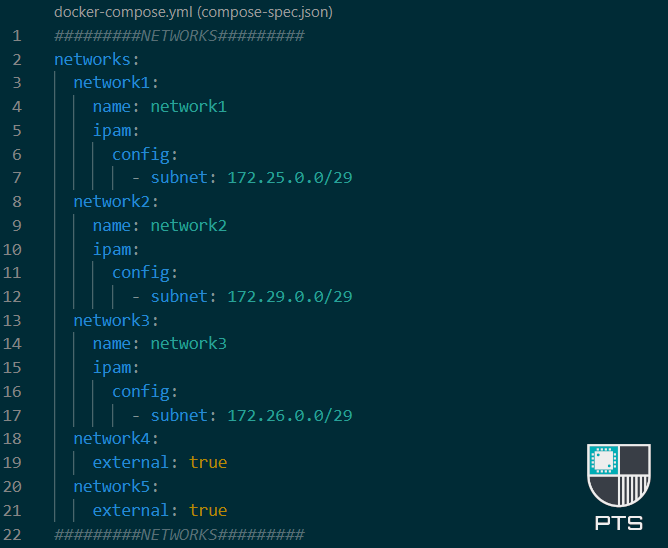
/30 on the isolated network subnet. Click here for the full chart
The above compose file should now make sense based on what we're trying to achieve. There are additional options you could make use of, for instance creating a macvlan instead of a bridge network, or manually assigning an IP to a container.
These are all possible, and I encourage you to research and understand why those may be good or bad things to do, given your own needs and use cases before going ahead and doing it, but they way to set up a macvlan network in compose would look something like this:
networks:
  macvlan:
    name: network_name
    driver: macvlan
    driver_opts:
      parent: eth0
    ipam:
      config:
        - subnet: "192.168.0.0/24"
          ip_range: "192.168.0.64/26"
          gateway: "192.168.0.1"
To figure out your parent network, check out my page here